

Car GPS systems have changed the way we navigate roads. They provide real-time directions and help drivers avoid traffic or find the fastest routes. Adding a backup camera to a GPS system enhances safety by showing what is behind the vehicle when reversing.
A GPS with a backup camera combines two useful tools in one device. It not only guides you on where to go but also helps you park and avoid obstacles. This makes driving easier, especially in tight or crowded spaces.
When choosing the best car GPS with a backup camera, it is important to consider screen size, ease of installation, image quality, and GPS accuracy. A clear and bright screen makes it easier to see maps and camera views. The device should be simple to set up and connect to your vehicle. Good GPS reception and reliable camera feed are critical for a worry-free driving experience.
We spent time testing several car GPS systems with backup cameras to find the ones that are clear, reliable, and easy to use.
Best Car GPS with Backup Camera
We have tested and reviewed several car GPS devices that come with backup cameras to help you drive safely and navigate easily. Our list features options that combine clear navigation with reliable rearview video. This guide will help you find the best model for your needs.
Yongeid Wireless Carplay GPS with Backup Camera

This device is a good choice for adding wireless CarPlay and a backup camera to any car without complex installation.
Pros
- Easy wireless connection to phone with responsive touchscreen
- Backup camera adds safety when reversing
- Fits all car types without removing the original radio
Cons
- Sometimes static noise when no music is playing
- Screen mount can feel a bit basic
- Audio quality is decent but not premium
We found the setup very simple and did not need to take apart the car’s dashboard. The adjustable mount sticks firmly and holds the 7-inch screen well, even on bumpy roads. Pairing with phones via Bluetooth or WiFi is fast, and the voice control through Siri or Google Assistant works smoothly for hands-free commands.
The GPS navigation is accurate and easy to follow. It gives clear voice directions and alerts about traffic and lane changes. The backup camera’s 180° view helps a lot when parking tight spots or backing into driveways, improving safety.
Audio options include Bluetooth speakerphone, connection through AUX, or FM transmitter. We noticed occasional static if no music was playing, but it is manageable. Overall, this unit adds modern smart features to older cars without a heavy price or tough install.
WOLFBOX G840S 4K Mirror Dash Cam

This dash cam with backup camera offers clear 4K video and a large mirror screen that helps us drive safer by cutting down blind spots.
Pros
- Sharp 4K front and good 1080p rear camera image quality
- Large 12″ screen shows both views at once with split-screen
- Easy WiFi connection to phone and built-in GPS tracking
Cons
- Installation can be tricky depending on the car model
- Requires a hardwire kit for 24-hour parking mode
- Rear camera angle is wide but not super wide for some tight spots
The front camera captures crisp 4K footage, which makes it easy for us to see details on the road. The rear camera works well in both day and night, thanks to its night vision feature. The display is bright and big enough to feel natural while driving, much better than traditional dash cams.
Connecting the dash cam to our phone through WiFi is simple. We can check routes and watch recorded videos without taking out the memory card. The GPS tracks our location and speed, adding extra information to the recordings.
Installing it took some time but was manageable with online guides. Getting the wires properly hidden needs patience. The 24-hour parking feature is useful but needs an extra power adapter to work correctly. Overall, this system balances great video quality with useful features for a safer driving experience.
IIWEY iK7 Car Stereo with Backup Camera

This system is a great pick if you want wireless Apple CarPlay and a backup camera all in one easy-to-use package.
Pros
- Large, sharp 10-inch touchscreen that’s easy to read
- Wireless CarPlay and Android Auto connect quickly every time
- Clear 4K front dashcam and 1080P backup camera make parking and driving safer
Cons
- Power cable quality could be better, needs careful handling
- Backup camera guidelines take some time to adjust perfectly
- Mounting options work well but may feel a bit temporary on some dashboards
We found the IIWEY iK7 very useful for upgrading an older vehicle without built-in CarPlay. The screen is bright and responsive, making navigation and calls simple. The wireless connection to phones works smoothly, so there’s no constant plugging in.
Using the backup camera gave us real confidence when reversing. The view is clear and the guidelines customizable, although we had to tweak them a few times to fit our car just right. The 4K dashcam records crisply, capturing important details with little hassle.
Installation was quick with both a suction mount and an adhesive option included. We appreciated the portable design since it can be moved or removed easily. Overall, this device balances useful features and ease of use well for a safer and smarter drive.
BuonaIdea Wireless Carplay Screen

This wireless CarPlay screen is a solid choice for anyone wanting easy setup and smooth wireless smartphone integration with a backup camera.
Pros
- Easy wireless connection to Apple CarPlay and Android Auto
- Simple plug-and-play installation without changing the car’s console
- Backup camera with night vision improves safety when parking
Cons
- Screen size is compact, which might not suit everyone
- Bluetooth audio transfer isn’t always perfectly smooth
- Some apps may lag slightly with mirror linking
We found the BuonaIdea wireless screen straightforward to install. It plugs into the cigarette lighter, so no complicated car disassembly is needed. Once connected, the CarPlay and Android Auto setup was stable and fast, letting us use navigation and music hands-free.
The 7-inch screen is bright and responds well to touch. Using voice commands through Siri or Google Assistant helped us keep focus on the road. The backup camera activates automatically in reverse and offers a clear, wide view even at night, which made parking a lot easier.
While the Bluetooth audio sometimes has minor hiccups, it still streams music well overall. Mirror linking lets you watch videos and use apps directly on the screen, but a few apps ran slower than expected. Overall, it’s a practical upgrade for most vehicles wanting wireless CarPlay with a helpful backup camera.
Madoec Portable CarPlay Screen

This device is a solid choice for anyone wanting easy wireless Apple CarPlay and a backup camera without changing their car’s stereo system.
Pros
- Wireless CarPlay and Android Auto work well with most smartphones
- Front and backup cameras deliver clear video and easy recording
- Simple installation without removing the original car radio
Cons
- Screen brightness can be hard to see in very bright sunlight
- Backup camera viewing angle is a bit narrow
- Some features require fiddling to connect right the first time
We found syncing our phone to this 9-inch screen was quick and hassle free. The wireless CarPlay function kept connections strong during drives, letting us use Google Maps and Siri without distraction.
The dual camera setup was a highlight. The front 4K dash cam recorded sharp video during the day, while the backup camera helped with parking in tight spots. Watching footage on our phone felt convenient and secure.
Setup was straightforward since it plugs into the cigarette lighter and connects through Bluetooth or aux. We liked that it didn’t force us to replace the car’s stereo or wiring, making this a great upgrade for older vehicles.
LANGDA Portable Carplay Screen

This device is a practical choice for those who want wireless Carplay and a backup camera without complex installation.
Pros
- Easy setup that fits almost any car
- Clear 7-inch HD touchscreen makes navigation simple
- Wireless Carplay reduces wire clutter and offers voice control
Cons
- Some users report occasional screen flicker or blackout
- Bluetooth audio can be unstable with some Android phones
- Charger cable durability might be an issue over time
We found the LANGDA Carplay screen really easy to install. It just snaps onto the dash, no major wiring needed. The wireless connection worked well, letting us focus on driving without fumbling with cords.
The screen is bright and responsive. Seeing the backup camera feed clearly made parking less stressful, and the voice commands helped keep distractions low. The GPS navigation felt reliable with good route options for city or highway driving.
On the downside, a few glitches appeared after extended use, like flickering or the screen briefly going black. Also, Bluetooth sound did occasionally cut out, especially from some Android phones, which was frustrating during longer drives. Overall, it’s a solid setup for the price but not perfect.
HAUXIY Q9S Wireless CarPlay & Backup Camera

This device delivers solid navigation and backup camera features while keeping installation quick and simple.
Pros
- Easy wireless connection with both iPhone and Android phones
- Clear 4K front camera and sharp 1080p rearview at night
- Simple setup without removing car components
Cons
- Requires your phone for navigation apps like Google Maps
- Parking monitoring needs extra wiring for full function
- Screen size might feel a bit small for some
We found the HAUXIY Q9S handy for staying connected on the road. The 9-inch screen is portable and plugs into the cigarette lighter, so installation was no hassle for us. Connecting via Bluetooth and WiFi felt fast and stable.
The front 4K camera really captured detailed driving footage, which adds a great layer of safety. The backup camera’s night vision worked well when reversing in the dark. Having a 7-meter rear cable made fitting it to different vehicle types easier than expected.
One downside is that navigation relies fully on your phone’s apps, so it won’t work on its own. Also, to use the parking monitoring feature, you have to deal with extra cables, which was a bit tricky. Still, for the price and features, it’s a practical choice for most drivers.
HAUXIY Wireless Carplay & Backup Cam

This device offers a solid upgrade with wireless CarPlay and a sharp backup camera, making driving easier and safer.
Pros
- Easy wireless connection to Apple CarPlay and Android Auto
- Clear 4K front and 1080p backup cameras improve visibility
- Simple plug-and-play setup without altering the original car system
Cons
- Some users may face occasional phone connection delays
- Backup camera installation wire can be tricky for beginners
- Mirror link can be less responsive with some phone models
The HAUXIY system works well to bring wireless CarPlay right to your dashboard. We found pairing with phones fast, letting us control navigation and calls using voice commands without distraction.
The cameras deliver detailed images, especially the 4K dash cam in front. Night vision on the backup camera helped us park safely, even in low light. The collision sensor added some peace of mind by locking important videos automatically.
Installation was simpler than expected since there’s no need to remove the car’s original radio. However, setting up the backup camera wire to the reverse light took a little patience on our end.
If you want reliable CarPlay plus a solid camera combo that fits most vehicles, the HAUXIY unit makes a good choice for daily use.
Volam 9″ Wireless Carplay Screen
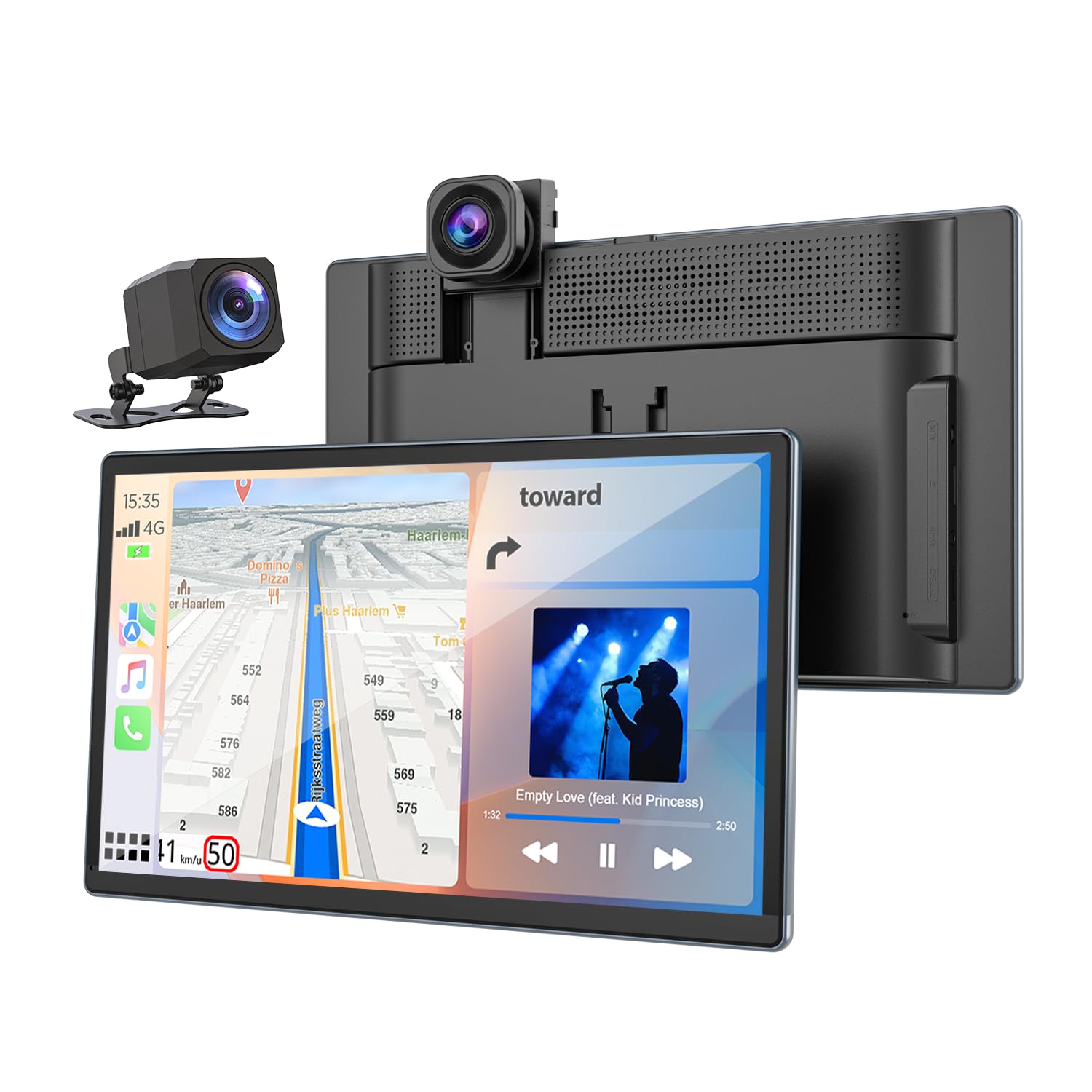
This unit is a solid pick for drivers who want a sharp screen, reliable backup camera, and wireless CarPlay all in one.
Pros
- Clear and bright 9-inch display with responsive touch
- Smooth wireless CarPlay and Android Auto connection
- Backup camera with night vision and helpful parking guidelines
Cons
- Running the backup camera cable can be tricky in some cars
- Audio output options may need fine-tuning for best sound
- The stand might require adjustment to avoid glare in certain lighting
The screen size feels just right—not too big or small—and the picture quality is crisp, especially the front 2.5K dash cam view. We liked how the wireless CarPlay paired quickly with our phone, so no more messy cords on the dashboard.
Switching to reverse displays the backup camera instantly. The night vision and dynamic lines really improve safety in tight spots. Although installing the camera cable took some patience, the final view made it worthwhile.
We also appreciated the voice control feature. Using Siri for navigation made hands-free driving simpler. Audio options like Bluetooth and AUX let us connect easily to the car stereo, though sometimes we had to adjust settings for the best sound quality.
Overall, this Volam screen adds smart features to any car without major hassle. It’s a practical upgrade for anyone needing clear navigation and backup support on a reliable display.
IIWEY iK11 Wireless CarPlay Screen

This device is a solid choice for anyone wanting a clear, large touchscreen with wireless Apple CarPlay, plus a backup camera that helps with parking.
Pros
- Large, sharp 11” screen that’s very easy to see
- Wireless Apple CarPlay and Android Auto work well with phones
- Backup camera with adjustable parking lines improves reversing safety
Cons
- Backup camera can need software updates to work right
- Does not connect to car stereo via Bluetooth, only phone
- Mounting options like suction cup may not suit all dashboards
We found the IIWEY iK11 screen bright and clear, making navigation and app use more relaxing. Its size really stands out, especially in older cars without built-in smart screens. The wireless connection freed us from cable clutter.
Using the backup camera was helpful for parking tight spots. The parking guide lines could be adjusted to fit different vehicles, which is a neat feature. At times, we had to update the software for the reverse cam to show images properly.
Setting up the whole system took only a few minutes, no wiring needed. It sits nicely on the dashboard without taking up much space. Voice commands worked as expected, helping us stay focused on the road while controlling the device.
Buying Guide
When choosing the best car GPS with a backup camera, we need to focus on a few key features. First, the screen size and resolution matter because a clear and large display helps us see directions and the backup view easily. Smaller screens can be hard to read, especially in bright sunlight.
Next, we should look at the camera quality. A good backup camera offers a wide view and clear images at night or in bad weather. Some cameras have night vision or waterproof designs, which improve safety.
We must also consider GPS features like real-time traffic updates and easy-to-use maps. Faster processors help the device run smoothly without lagging, which is important while driving.
Battery life and power options are important too. Some models work only when plugged in, while others have rechargeable batteries. We need to decide which fits our daily use better.
| Feature | What to Look For | Why It Matters |
|---|---|---|
| Screen Size | 5 to 7 inches, high resolution | Easier to read maps & camera |
| Camera Quality | Wide-angle, night vision, waterproof | Clear and safe backing up |
| GPS Features | Real-time updates, fast processor | Accurate and smooth navigation |
| Power Options | Rechargeable or plug-in | Convenience and reliability |
Finally, ease of installation and user interface should be simple. We want a device that fits well in our car and is easy to operate without distraction.
Editor’s Choice
We chose the Garmin DriveAssist 51 LMT-S as our top pick for a GPS with a backup camera. It combines clear navigation with a built-in dash camera that also acts as a backup camera. This two-in-one feature saves space and reduces clutter on your dashboard.
The screen is 5 inches, which is big enough to see details without being distracting. The device offers free lifetime map updates and traffic alerts, helping us avoid delays.
Key features include:
- Built-in dash and backup camera
- Voice-activated navigation
- Lane assist and alert system
- Free lifetime updates
The backup camera activates automatically when we put the car in reverse. This makes parking and reversing safer and easier, especially in tight spots.
We also like how easy it is to set up. The GPS mounts securely on the windshield, and the camera wires connect neatly. For a device that combines safety and convenience, this model stands out.
Its price is reasonable compared to buying a GPS and backup camera separately. The Garmin DriveAssist 51 LMT-S balances features, usability, and cost very well for most drivers.
Where to Buy – Best Amazon Deals
We found that Amazon offers a wide selection of car GPS devices with backup cameras. It’s a good place to compare different models, prices, and customer reviews all in one spot.
You can filter options by price, brand, and features. Often, Amazon has deals that can save us money, especially during sales events like Prime Day or Black Friday. Some GPS units even come with free shipping or bundle offers.
Here are a few tips to get the best deals on Amazon:
- Look for verified customer reviews. They show real experiences and help us avoid low-quality products.
- Check for warranty and return policies. This protects us if the device doesn’t work as expected.
- Compare prices across similar models. Sometimes newer models offer better value.
To help us decide, we can use Amazon’s list views and product comparison tools. This makes it easier to spot the most popular or highly rated options.
Buying from Amazon also means we get fast shipping, especially if we have Prime. That’s important if we want to install the system quickly.
Example deals you might find:
| Model | Price Range | Ratings (out of 5) | Features |
|---|---|---|---|
| Garmin Drive Assist 51 | $150-$200 | 4.3 | Built-in dash cam, voice control |
| eRapta ERT01 | $90-$120 | 4.1 | 7” screen, night vision camera |
| Podofo 7” GPS | $100-$130 | 4.0 | Touch screen, waterproof camera |
We recommend checking Amazon regularly because prices and deals can change fast.
FAQs
What makes a good GPS with a backup camera?
We look for clear screen resolution, easy installation, and reliable GPS navigation. The backup camera should offer a wide view and good night vision.
Can we install the system ourselves?
Yes, many models come with user-friendly instructions. However, some might need professional help, especially if wiring is complex.
Do these devices work with all cars?
Most GPS units with backup cameras fit a wide range of vehicles. Still, it’s important to check compatibility before buying.
Is the backup camera always on?
Usually, it turns on automatically when the car is in reverse. This helps us see behind the vehicle without extra steps.
| Feature | Importance |
|---|---|
| Screen size | Clear viewing |
| Camera angle | Wide coverage |
| GPS accuracy | Safe navigation |
| Ease of use | Simple controls |
Are these systems expensive?
Prices vary depending on features. We can find budget models with basic functions or more advanced ones with extra options.
Do they require internet?
Some GPS units use offline maps, so no internet is needed. Others offer live traffic updates but require a connection.
How long does installation take?
Simple setups can take under an hour. Complex installations with multiple wires might take longer.
Conclusion
Choosing the best car GPS with a backup camera depends on what we value most: clear navigation, easy installation, or camera quality. Each option offers a mix of features that help us drive safely and confidently.
We should look for a device that fits our car and meets our needs. Important points include screen size, map updates, and night vision for the backup camera. These make a big difference in everyday use.
Here is a simple table to compare key features:
| Feature | Why It Matters |
|---|---|
| Screen Size | Easier to see directions |
| Camera Quality | Clearer view when reversing |
| Map Updates | Accurate, current routes |
| Installation | How easy it is to set up |
We recommend considering these factors carefully. Our choice should improve safety without adding too much complexity.
In the end, a good GPS with backup camera helps us stay focused on the road. It gives practical support when parking or driving unknown routes.
We encourage us to pick a system that balances usefulness and simplicity. That way, the technology truly makes driving smoother and safer.