
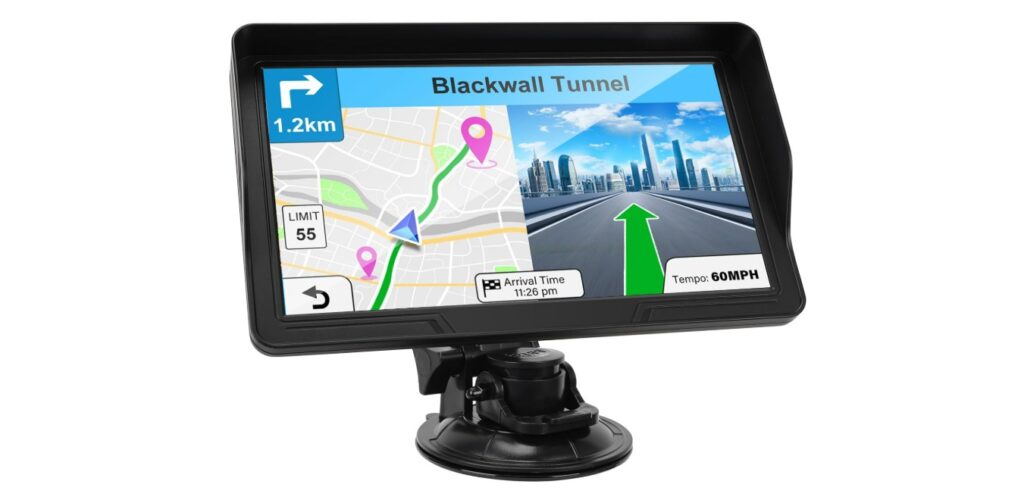
GPS devices for cars help drivers find directions and avoid getting lost. Many newer models offer live traffic updates, which tell you about road conditions, accidents, and delays in real time. This helps drivers pick the fastest routes and avoid traffic jams.
A GPS with traffic updates often uses a mobile connection or built-in radio signals to receive the latest info. These updates can save time during rush hour or long trips by guiding you around slow spots. Choosing the right GPS means considering how accurate and timely the traffic data is, as well as how easy the device is to use while driving.
When buying a GPS with traffic updates, it’s important to look at screen size, map quality, update speed, and whether the device requires a subscription for traffic services. Ease of mounting and voice guidance also matter. We tested multiple models to find the best GPS devices that keep you informed about traffic and help you get where you need to go efficiently.
Best GPS for Car with Traffic Updates
We have tested and reviewed top GPS devices that provide accurate directions and real-time traffic updates. Our list includes reliable options to help you avoid delays and reach your destination quickly. These GPS units are easy to use and keep you informed on the road.
Garmin DriveSmart 76

The Garmin DriveSmart 76 is a solid choice for drivers who want reliable traffic updates and a clear, large screen to guide them.
Pros
- Bright and easy-to-read 7-inch display
- Helpful live traffic updates and driver alerts
- Built-in Alexa and voice control for hands-free use
Cons
- Setup can be a bit tricky, especially updating maps via Wi-Fi
- Sometimes the touchscreen is less responsive than expected
- Extra features require pairing with the smartphone app
We found the large screen really useful when driving. It’s bright and sharp, so it’s easier to see directions and alerts without squinting. The voice assist helped us keep our hands on the wheel, especially with the Alexa feature, which was nice for playing music or getting quick info.
The traffic updates are accurate and timely. It helped us avoid some slowdowns and find cheaper fuel, which made trips smoother. The driver alerts like warnings for sharp curves and speed changes made us feel safer on unfamiliar roads.
However, setting up the device and updating maps wasn’t as straightforward as we hoped. The touchscreen sometimes missed taps, meaning we had to try a couple of times. Also, many features only work well when connected to the Garmin Drive app on a smartphone, which adds a step to the process.
Garmin Drive 53 GPS Navigator

This GPS is a solid choice for drivers who want simple navigation with useful traffic alerts and helpful local info.
Pros
- Clear and bright 5” touchscreen makes maps easy to read
- Helpful driver alerts for curves, school zones, and speed changes
- Shows stops for food, fuel, and rest along your route
Cons
- Battery life is very short, so it needs to stay plugged in
- No real-time traffic updates without extra apps or services
- Interface can feel basic compared to newer models
We found the Garmin Drive 53 easy to use right out of the box. The screen is bright and responsive, which made following directions stress-free. The driver alerts kept us aware of important conditions ahead, helping us adjust speed safely when needed.
During long drives, it was handy to see rest stops and restaurants along the way. The Tripadvisor ratings helped us pick decent spots without guessing blind. Finding national parks and landmarks was straightforward, adding some fun to our trips.
However, the short battery life means it’s best for use with your car charger. Also, this device doesn’t offer live traffic updates on its own, so you won’t get reroutes for sudden jams unless you pair it with another service. Still, it does a good job simplifying navigation with reliable, clear guidance.
If you want something simple and reliable without too many extras, the Garmin Drive 53 is worth considering.
Garmin DriveSmart 66

We recommend the Garmin DriveSmart 66 for those who want clear navigation and helpful traffic updates to make driving easier and safer.
Pros
- Bright, easy-to-read 6-inch screen
- Useful driver alerts for safety
- Real-time traffic and updates via smartphone app
Cons
- Sometimes struggles with unusual place names
- Voice commands can miss a few words
- Screen size may feel small for some users
The Garmin DriveSmart 66’s screen is sharp, and we always found it easy to follow the directions. The alerts for speed changes and curves help us stay aware without needing to watch the road too closely. We liked having the built-in databases for national parks and historical sites—it makes road trips more interesting.
Connecting it to the Garmin Drive app gave us live updates on traffic, fuel prices, and weather. This saved time by letting us avoid heavy traffic. Hands-free voice control worked well most of the time, but it occasionally misunderstood some place names.
Charging two devices at once using the dual USB ports was a big convenience on longer drives. Overall, the Garmin DriveSmart 66 made navigation simple and added helpful safety features for daily use or road trips.
Garmin DriveSmart 86

This GPS is a solid choice for drivers who want clear maps and real-time traffic info in an easy-to-use device.
Pros
- Large, bright 8-inch screen that’s easy to read
- Reliable live traffic updates and driver alerts
- Hands-free voice commands and Alexa support
Cons
- Short battery life, so it needs power most trips
- Setup can be tricky if you aren’t used to Garmin apps
- Some users find map updates confusing without a computer
We found the screen size helpful while driving. It’s easy to glance at the map and catch important alerts like speed changes or sharp curves. The display stays bright and clear even in sunlight, which makes following directions less stressful.
The real-time traffic updates worked well to steer us around jams. Paired with the Garmin Drive app, we got live info on fuel prices, parking, and even traffic cameras. This helped avoid delays on busy roads.
Voice commands are useful too. We could ask for places, calls, or music without taking our hands off the wheel. Alexa built in is a nice bonus, but you need your phone connected, and it’s best to only use this when stopped or safe.
This unit’s biggest downside is the battery life. It’s short, so keeping it plugged in is pretty much required. Also, if you’re new to Garmin’s system, updating maps via Wi-Fi or app might take some time to get right.
Overall, it’s a dependable GPS with strong traffic features and a user-friendly screen that makes daily drives and road trips easier.
Garmin DriveSmart 66

We found the Garmin DriveSmart 66 very reliable for real-time traffic updates and clear navigation during our drives.
Pros
- Easy-to-read 6-inch bright screen
- Live traffic and hazard alerts keep us aware and safer
- Hands-free voice assist and Alexa integration work well for multitasking
Cons
- Initial setup and updates can be a bit tricky
- Short battery life means it needs to stay plugged in
- Sometimes live features need your phone connected to work fully
The bright 6-inch screen made it simple to glance at directions without distraction. Alerts for speed limits, sharp turns, and school zones helped us stay cautious on unfamiliar routes. We appreciated how maps were kept sharp and updated for North America.
Linking the GPS with the Garmin Drive app on our phones gave us live traffic info, fuel prices, and even parking help. Alexa’s voice commands let us request music or news, which was useful on longer trips. The voice assist answered navigation requests quickly without much fuss.
Overall, this model performed well for daily commuting and road trips. It felt like a good balance of high-tech features and practical safety tools. If paired properly and kept charged, it makes navigating easier and safer.
HINYFVOZ 9-Inch GPS Navigator

This GPS is a solid choice for drivers who want a big, clear screen with up-to-date maps and helpful safety alerts.
Pros
- Large 9-inch screen makes navigation easy to see
- Free lifetime map updates keep routes current
- Custom routing for trucks and RVs avoids risky roads
Cons
- FM transmitter audio quality can be a bit weak
- Touchscreen sometimes needs firm presses to register
- Mount could feel bulky on smaller dashboards
Using this GPS, we noticed the bright 9-inch screen showed directions clearly at a glance, which made following the route less stressful. The interface feels straightforward, so we didn’t waste time digging through menus.
One highlight is the truck and RV routing feature. Inputting our vehicle size helped avoid low bridges and narrow roads, which was a useful safety measure for larger vehicles.
The voice guidance kept us informed with alerts for speed limits and red light cameras. While the FM transmitter broadcasts voice instructions through the car radio, we found the sound not as strong as we hoped, so some might prefer using the built-in speaker.
Overall, it’s a dependable unit for everyday drivers and those with bigger vehicles who need accurate traffic updates and clear directions.
Garmin Drive 53 with Traffic
The Garmin Drive 53 is a reliable GPS that helps us avoid traffic and stay aware on the road with clear alerts and easy-to-use features.
Pros
- Bright and sharp 5” touchscreen makes maps easy to see
- Traffic alerts guide us around jams and suggest faster routes
- Helpful driver warnings for curves, speed changes, and school zones
Cons
- Battery lasts only about an hour when unplugged
- Occasional hiccups with map updates can be frustrating
- Some features feel basic compared to smartphone navigation apps
Using the Garmin Drive 53 made our drives smoother, especially when traffic slowed us down. The screen is clear and responsive, letting us glance quickly at directions without distraction. We appreciated the real-time traffic data that rerouted us to avoid long waits.
The alerts for sharp turns, speed changes, and school zones gave us extra confidence when driving unfamiliar roads. We also liked seeing nearby stops for food, fuel, and rest without hunting on our own.
Though the device worked well overall, we noticed the battery is short if we try to use it away from the car’s power. Also, updating the maps was not always seamless, which might require patience. Still, it’s a solid choice if you want a stand-alone GPS with practical traffic help on your trips.
Garmin Drive 52

We recommend the Garmin Drive 52 for anyone who wants reliable traffic updates and easy-to-use navigation during road trips.
Pros
- Clear and simple screen displays
- Real-time traffic alerts without a phone
- Useful driver warnings for safer trips
Cons
- Updates need a micro SD card installation
- Power cable may not support all features
- Screen size might feel small for some users
Using the Garmin Drive 52 feels like having a steady guide on the road. Its 5-inch display is bright and easy to read, and the menus are straightforward, which helps us focus more on driving. Traffic reports come right away, so we avoid delays and road work without needing our phones.
The driver alerts make a big difference, especially on unfamiliar roads. It warns us of sharp turns and speed changes, which feels safer. We also liked having extra info like historic sites and popular stops available on the device.
One thing to watch out for is updating the maps. It requires a micro SD card, and that process can take a bit of time. Also, the power cable included may not always support the traffic feature fully, so double-check that before relying on it. Overall, it’s a solid GPS that handles traffic well and stays simple to use.
HINYFVOZ 7″ GPS Navigator

This GPS offers solid navigation with up-to-date maps and useful traffic alerts, making it a reliable choice for drivers who need real-time traffic info.
Pros
- Clear 7-inch touchscreen that’s easy to read and use
- Vehicle-specific routing helps avoid restricted roads
- Lifetime free updates keep maps current without extra cost
Cons
- Suction cup mount can lose grip in very hot or cold weather
- Interface can be a bit tricky when switching between screens
- No built-in FM radio, only GPS audio transmission
The screen is the first thing we noticed. It’s bright and clear, making maps easy to see in any light. The voice guidance spoke directions clearly, keeping our focus on the road. It felt like the device understood the kind of vehicle we were driving, routing based on size and weight, which worked well when avoiding no-go areas.
Setup was straightforward. The mount holds well on the dashboard or windshield after following the instructions carefully. We had to moisten the suction cup to get a strong seal, especially on cooler days when sticking power dropped.
Traffic alerts like speed cameras and red-light warnings were helpful, making us more aware around tricky spots. Updates come through USB without subscriptions, so the system feels future-proof. The touchscreen could be more user-friendly, especially when flipping through menus. Overall, it’s a dependable GPS that fits well for cars, RVs, and trucks needing live traffic updates.
HINYFVOZ GPS Navigator

This GPS is a solid pick for drivers who want clear routes, especially if they drive trucks or RVs, thanks to its custom vehicle routing and traffic alerts.
Pros
- Custom routing helps avoid low bridges and weight limits
- Large 7-inch screen is easy to see while driving
- Lifetime map updates keep navigation current
Cons
- Initial GPS signal connection can take a long time
- Setup instructions require close attention
- Audio directions depend on car stereo connection
We found the large, bright touchscreen very helpful when driving. It showed clear turn-by-turn directions and traffic alerts, which made urban driving simpler. The voice prompts were easy to hear, especially when using the FM transmitter feature, but it depends on your car’s stereo setup.
Entering vehicle size details was straightforward. This made a big difference for avoiding restricted roads, especially for truck and RV drivers. We appreciated the speed camera and red light warnings because they encouraged safer driving behavior.
The device takes a bit of time to lock onto a GPS signal the first time. You need to be in an open area during this process. The setup instructions also require patience to follow fully, but once done, navigation worked smoothly across different trips.
If you want a GPS that fits bigger vehicles and provides reliable traffic updates, the HINYFVOZ GPS Navigator is a practical option to consider.
Buying Guide
When choosing the best GPS for your car with traffic updates, we focus on a few key features. First, the quality of traffic data is important. It should be accurate and updated often, so we avoid delays or roadblocks.
Another feature to consider is the size of the screen. A larger screen helps us see maps and directions clearly, but it must fit well on the dashboard. Touchscreen functionality makes it easier to enter destinations quickly.
Battery life matters if we plan to use the GPS outside the car. However, most car GPS devices work when plugged in, so this is less critical. Still, a good battery can be useful in emergencies.
Connectivity options are also important. Some GPS devices connect through smartphone apps or use Wi-Fi and Bluetooth. This allows us to get live traffic data and software updates without manual input.
Here is a simple feature comparison to keep in mind:
| Feature | Why It Matters | What to Look For |
|---|---|---|
| Traffic Updates | Avoid traffic jams | Real-time updates, frequent refreshes |
| Screen Size | Easy map viewing | 5 to 7 inches, clear display |
| User Interface | Quick input and easy navigation | Responsive touchscreen |
| Connectivity | Access live info and updates | Bluetooth, Wi-Fi, app support |
| Battery Life | Use without power for short periods | Long-lasting or at least backup battery |
We should also consider how easy the GPS is to mount and use daily. A good GPS must feel natural when we drive, not distracting or difficult to handle.
Editor’s Choice
We chose the Garmin DriveSmart 65 as our top pick for the best GPS with traffic updates. It offers clear, easy-to-read maps and provides reliable live traffic alerts. This helps us avoid delays and find the fastest routes during busy drives.
The device supports voice-activated navigation, which keeps our focus on the road and makes it simple to update routes without touching the screen. It also includes helpful driver alerts, such as warnings for sharp curves and speed changes.
Here’s a quick look at the key features:
| Feature | Details |
|---|---|
| Screen Size | 6.95 inches |
| Traffic Updates | Real-time, via smartphone link |
| Voice Control | Yes |
| Map Updates | Free lifetime |
| Driver Alerts | Yes |
We appreciate that Garmin’s system links to our phones to get live data, ensuring the traffic info is current. The screen is large enough for easy reading but not too big to distract us.
The Garmin DriveSmart 65 balances functionality, ease of use, and reliability. It works well for daily commuting or longer road trips where traffic can slow us down. This makes it a solid choice for anyone needing smart traffic updates with trusted GPS directions.
Where to Buy – Best Amazon Deals
We find Amazon to be one of the best places to buy GPS devices with traffic updates. They offer a wide selection of models from top brands. This makes it easy for us to compare features and prices all in one spot.
Amazon often runs discounts on popular GPS devices. It’s worth checking their daily deals to catch the best offers. We can also read user reviews to see how a GPS performs in real-world use.
Using Amazon’s search filters helps us narrow down choices by price, brand, and customer rating. Plus, fast shipping options mean we can get our GPS quickly, sometimes the next day.
| Feature | Benefit |
|---|---|
| Wide Selection | Pick from many brands and models |
| User Reviews | Honest feedback from real users |
| Fast Shipping | Get your GPS quickly |
| Frequent Deals | Save money with discounts |
We recommend signing up for Amazon Prime if you want faster delivery and extra savings. Some GPS models come bundled with updates or accessories at better prices through Amazon.
In short, Amazon makes buying a GPS with live traffic updates simple and straightforward for us. The combination of choices, prices, and reviews helps us make smart decisions.
FAQS
What makes a GPS good for traffic updates?
We look for devices that offer real-time traffic alerts. These include slowdowns, accidents, and road closures. A good GPS should update often and reroute quickly.
Can I use my phone as a GPS with traffic info?
Yes, many apps like Google Maps and Waze provide live traffic updates. Phones use cellular data to get the latest info. However, sometimes signal loss can affect accuracy.
Do all GPS devices need internet for traffic updates?
No, some use built-in radios to receive traffic data without internet. These systems update limited info. Devices connected to the phone or Wi-Fi usually provide faster updates.
Is it worth buying a dedicated GPS over a smartphone?
Dedicated GPS devices often have larger screens and better battery life. They don’t rely on cellular signal alone. Yet, if you have a reliable phone and data plan, that might be enough.
How often does the traffic info update?
Updates vary by device and app. Most update every few minutes. Faster updates help avoid traffic jams better.
| Feature | Benefit |
|---|---|
| Real-time updates | Avoid delays |
| Automatic rerouting | Find faster routes |
| Clear display | Easy reading while driving |
We focus on these features when choosing the best GPS for traffic updates.
Conclusion
We found that the best GPS devices with traffic updates help save time and reduce stress while driving. They provide real-time information that adjusts your route based on traffic conditions. This can make a big difference, especially during rush hour or road construction.
Some GPS units use mobile data, while others rely on built-in connections. Both options work well, but we need to consider costs like data plans or device prices. Features like voice commands and clear maps also make driving easier.
Here are key points to look for in a GPS with traffic updates:
- Accurate, real-time traffic info
- Easy-to-use interface
- Clear voice guidance
- Regular map updates
- Affordable data or subscription costs
Choosing the right GPS depends on our driving needs and budget. Some prefer simple devices, while others want more advanced features. We can also use smartphone apps if we want a flexible and cheaper solution.
By picking a reliable GPS with live traffic updates, we drive smarter and safer. It helps us avoid delays and reach destinations on time. This makes our trips smoother and more efficient every day.