
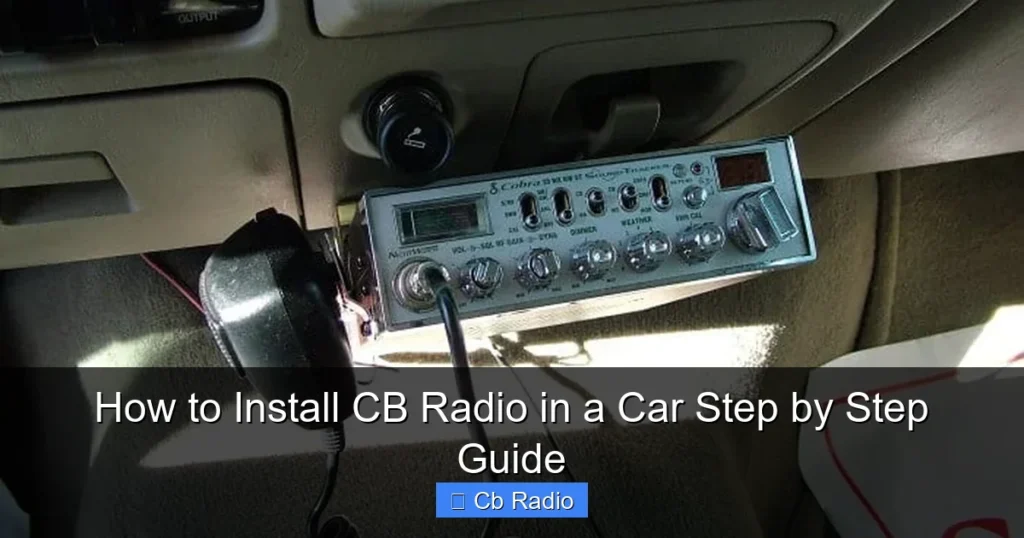
Installing a CB radio in your car is easier than you might think. This guide walks you through every step, from choosing the right spot to wiring and testing your setup. With clear instructions and handy tips, you’ll be chatting on the road in no time.
Key Takeaways
- Choose the right CB radio: Pick a model that fits your needs and vehicle size.
- Find the perfect mounting spot: Ensure easy access without obstructing your driving view.
- Properly ground the radio: A good ground connection improves performance and safety.
- Install the antenna correctly: The antenna is crucial for clear transmission and reception.
- Test your setup: Verify all connections and signal strength before hitting the road.
- Follow safety precautions: Avoid interfering with vehicle electronics and ensure secure wiring.
Quick Answers to Common Questions
How long does it take to install a CB radio in a car?
Most installations take between 1 to 3 hours, depending on your experience and vehicle type.
Can I install a CB radio myself, or do I need a professional?
You can install a CB radio yourself with basic tools and this guide. However, professional help is recommended if you’re uncomfortable with wiring.
Where is the best place to mount a CB radio inside a car?
Common spots include under the dashboard, on the center console, or near the passenger side where it’s easily accessible.
Do I need a special antenna for my CB radio?
Yes, use an antenna designed for CB frequencies (around 27 MHz) for optimal performance.
Will a CB radio interfere with my car’s electronics?
If installed properly with good grounding and cable routing, a CB radio should not interfere with vehicle electronics.
📑 Table of Contents
- How to Install CB Radio in a Car Step by Step Guide
- 1. Understanding Your CB Radio and Vehicle Requirements
- 2. Choosing the Right Mounting Location Inside Your Car
- 3. Wiring Your CB Radio for Power and Ground
- 4. Installing the Antenna for Optimal Performance
- 5. Connecting and Testing the Entire System
- 6. Tips and Safety Precautions for a Successful Installation
- Conclusion
How to Install CB Radio in a Car Step by Step Guide
CB radios have been a popular communication tool for decades, especially among truckers, off-roaders, and hobbyists. Installing one in your car can open a world of immediate communication without relying on cellular networks. Whether you want to stay connected on long trips or just enjoy chatting with fellow enthusiasts, learning how to install a CB radio is a handy skill.
Many people hesitate to install a CB radio themselves, thinking it’s complicated or time-consuming. But with the right guidance and a little patience, you can have your CB radio up and running quickly. This guide breaks down every step so you can confidently install your CB radio in your car and enjoy clear, reliable communication.
1. Understanding Your CB Radio and Vehicle Requirements
What You Need to Know About Your CB Radio
Before diving into installation, familiarize yourself with your CB radio’s features, power requirements, and accessories. Most CB radios operate on 12V DC power, which matches your car’s electrical system. Check the instruction manual for the exact voltage and current specifications to avoid any damage.
Visual guide about How to Install CB Radio in a Car Step by Step Guide
Image source: volvovibes.com
Assessing Your Vehicle
Consider your car’s layout. You’ll need a spot to mount the radio, a place to run the antenna cable, and access to a power source. Some cars have plastic panels or rubber grommets that you can use to route wires without drilling holes. Make sure the vehicle’s battery and electrical system are in good condition to handle the additional load.
2. Choosing the Right Mounting Location Inside Your Car
Factors to Consider for Mounting
The CB radio needs to be within easy reach but not in the way of your driving. Common mounting spots include under the dashboard, on the center console, or near the passenger side. Look for a flat surface that can support the radio and won’t interfere with airbags or other controls.
Mounting Brackets and Hardware
Most CB radios come with mounting brackets and screws. Use these to securely attach the radio to the chosen spot. If the supplied hardware doesn’t fit your car or feels unstable, aftermarket brackets are available that offer more flexibility.
3. Wiring Your CB Radio for Power and Ground
Connecting to a Power Source
Your CB radio needs constant 12V power to operate correctly. The easiest way is to connect the radio’s red power wire directly to the car battery’s positive terminal, often through an inline fuse to protect the circuit. Alternatively, you can tap into the car’s fuse box using a fuse tap, but ensure it’s a constant power source that doesn’t turn off with the ignition.
Establishing a Good Ground
The black ground wire from the radio must be connected to the car’s chassis or directly to the negative battery terminal. A solid ground reduces noise and improves transmission quality. Clean the connection point to bare metal to ensure good contact.
Using a Fuse for Safety
Always include a fuse close to the power source, typically between 5 and 10 amps depending on your radio’s requirements. This fuse protects your wiring and radio from electrical shorts or surges.
4. Installing the Antenna for Optimal Performance
Selecting the Right Antenna
The antenna is the heart of your CB system. Choose one rated for CB frequencies (around 27 MHz) and suitable for your vehicle size. Popular options include magnetic-mount antennas, whip antennas, and roof-mounted antennas. Magnetic mounts are easy to install and remove, while permanent mounts offer better performance.
Mounting the Antenna
If using a magnetic mount, place it on a clean, flat metal surface on the roof or trunk. For permanent mounts, you may need to drill a hole through the body or use existing mounts. Take care to seal any holes to prevent leaks.
Routing the Antenna Cable
Run the coaxial cable from the antenna to the radio carefully. Avoid sharp bends and keep the cable away from other electrical wires to reduce interference. Use rubber grommets or cable clips to protect the wire where it passes through metal panels.
5. Connecting and Testing the Entire System
Hooking Up the Antenna Cable
Connect the coaxial cable to the radio’s antenna connector, usually a PL-259 plug. Make sure it’s tight and secure to avoid signal loss.
Powering On and Initial Setup
Turn on your vehicle and then the CB radio. Adjust the squelch and volume controls to reduce background noise. Use the radio’s channel selector to pick a standard channel like channel 19, commonly used for highway communication.
Testing Transmission and Reception
Try making a test call or listening to nearby CB users. If you have a friend with a CB radio, coordinate a test to confirm your signal is clear. If you notice static or weak signals, check your antenna ground, cable connections, and radio settings.
6. Tips and Safety Precautions for a Successful Installation
Avoid Interference with Vehicle Electronics
Keep antenna cables and power wires away from sensitive electronics like your car stereo or GPS. This minimizes interference and ensures smooth operation.
Secure All Wires Properly
Use zip ties and cable clamps to keep wiring neat and prevent them from hanging loosely or becoming pinched. Loose wires can cause shorts or damage over time.
Follow Local Regulations
Check your area’s laws regarding CB radio and antenna installation. Some regions have restrictions on antenna height or placement. Staying compliant avoids fines and ensures safety.
Maintain Your CB Radio System
Periodically inspect your antenna, cables, and connections. Clean contacts if necessary and replace worn parts to keep your radio working at its best.
Conclusion
Installing a CB radio in your car is a rewarding project that enhances your communication capabilities on the road. By carefully selecting the mounting location, wiring the radio properly, and installing a quality antenna, you’ll enjoy clear and reliable CB communication. Remember to take your time, follow safety guidelines, and test your setup thoroughly.
With this step-by-step guide, you now have the knowledge to install your CB radio confidently. Soon, you’ll be joining conversations, sharing information, and staying connected wherever your journey takes you.
Frequently Asked Questions
What tools do I need to install a CB radio in my car?
You’ll need basic tools like screwdrivers, wire strippers, crimp connectors, a drill (if mounting requires holes), and possibly a multimeter to check voltage.
Can I use my car’s cigarette lighter socket for CB radio power?
While some CB radios can run off the cigarette lighter, it’s better to connect directly to the battery or fuse box for a stable power supply.
How do I ground my CB radio properly?
Connect the radio’s ground wire to a clean, bare metal part of the car’s chassis or directly to the negative battery terminal to ensure good grounding.
Is it necessary to use a fuse in the power wire?
Yes, adding an inline fuse close to the power source protects your radio and vehicle wiring from electrical faults.
What channel should I use on my CB radio?
Channel 19 is the most common for highway communication, but you should choose a channel based on your location and purpose.
How can I improve my CB radio’s signal?
Make sure your antenna is properly installed and grounded, use high-quality coax cable, and keep connections tight and clean for the best signal.