


A clicking noise when starting a Toyota Camry usually points to a problem with the car’s electrical system, most often the battery or the starter motor. If the engine doesn’t crank and you hear rapid clicking, it often means the battery is weak, the starter is faulty, or there is a poor connection somewhere in the starting circuit. This sound is an important clue for diagnosing why the car won’t start.
Other common reasons include corroded battery terminals or a damaged solenoid wire harness preventing the starter from working properly. Sometimes, the problem might be electrical connections that need tightening or cleaning. Identifying the cause early can save time and avoid more expensive repairs later.
Understanding these common issues helps owners decide whether they can fix the problem themselves or if it’s better to get professional help. Simple checks like testing the battery or inspecting cables can often point out the issue quickly and get the Toyota Camry starting reliably again.
Key Takeways
- Clicking noises usually indicate battery or starter-related problems.
- Corroded terminals and loose connections are common causes.
- Early diagnosis helps prevent costly repairs and keeps the car reliable.
Contents
- 1 Common Causes of Toyota Camry Clicking Noise When Starting
- 2 Diagnosing the Clicking Noise in Your Toyota Camry
- 3 Battery-Related Issues in Toyota Camry
- 4 Starter Motor Troubles
- 5 Electrical System Checks
- 6 Other Potential Causes of Clicking Noises
- 7 When to Seek Professional Help
- 8 Preventative Maintenance Tips for Toyota Camry Owners
- 9 Conclusion
- 10 FAQs
Common Causes of Toyota Camry Clicking Noise When Starting
A clicking noise during startup usually points to problems with the electrical system or components involved in starting the engine. The cause is often related to parts that control power delivery or engine engagement. Knowing the specific issues helps pinpoint the fix.
Weak or Dead Battery
The most frequent reason for a clicking sound when starting a Toyota Camry is a weak or dead battery. This happens because the battery doesn’t have enough power to turn the starter motor fully. When the power is low, the starter solenoid clicks but cannot engage the engine to crank.
Batteries weaken over time due to age, extreme temperatures, or leaving lights on. Checking the battery voltage with a multimeter can confirm if it needs charging or replacement. Jump-starting the car often resolves the issue temporarily if the battery is weak but not fully dead.
Faulty Starter Motor
A bad starter motor can also cause a clicking noise without engine turnover. The starter has internal parts like the solenoid and brushes that may wear out. When this happens, the solenoid still clicks, but the motor fails to spin.
If the starter motor is failing, repeated clicking sounds may occur when turning the key. The vehicle may start intermittently or not at all. Testing involves checking voltage at the starter and listening for clicks. If confirmed faulty, a starter motor replacement is necessary.
Corroded or Loose Battery Connections
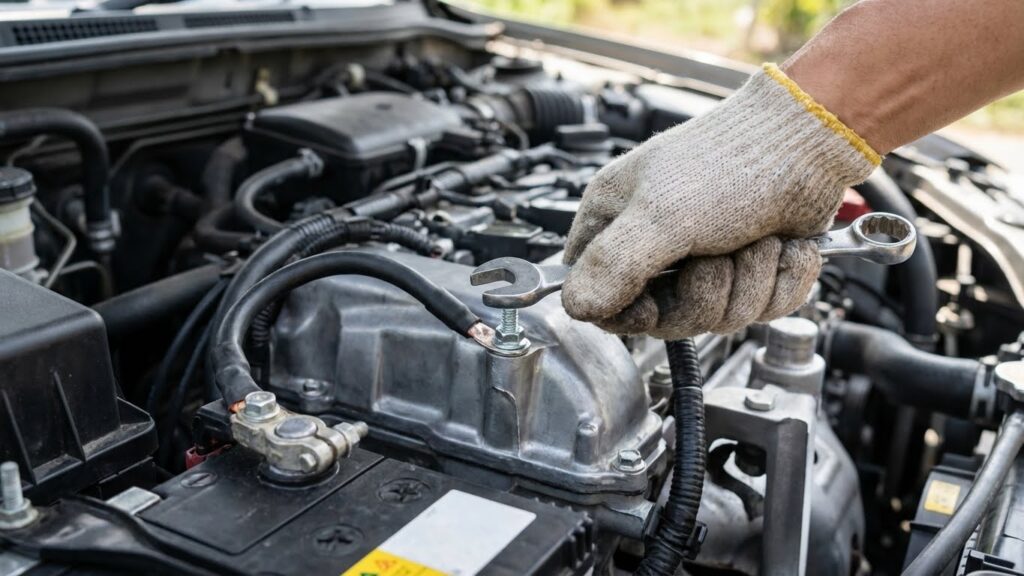
Poor battery connections can mimic symptoms of a weak battery. Corrosion buildup or loose terminals reduce the flow of electricity. This causes the starter solenoid to click but prevents enough current from reaching the motor.
Cleaning the battery terminals and cable ends with a wire brush or terminal cleaner often restores the connection. Tightening loose clamps can solve the problem quickly. Inspecting the battery cables regularly can prevent this issue from causing starting problems.
Ignition Switch Problems
The ignition switch sends power to the starter when the key is turned. If this switch is worn or faulty, it may fail to provide a proper signal. This can cause a clicking sound as the starter receives partial power but does not fully engage.
Symptoms include inconsistent starting and delayed engagement of the starter motor. Diagnosing ignition switch issues involves testing the output voltage when the key is turned. Replacing a faulty ignition switch will restore reliable startups.
Diagnosing the Clicking Noise in Your Toyota Camry
To figure out why a Toyota Camry makes a clicking noise when starting, it is important to listen carefully, use the right tools, and inspect key parts. Focusing on the sound’s location, checking battery health, and examining electrical connections can pinpoint the problem.
Identifying the Source of the Sound
The clicking noise often comes from the starter motor or the relay behind the dashboard. The driver should pay attention to whether the clicking happens once or repeatedly when turning the key. A single click usually means the starter is getting some power but cannot turn the engine. Multiple clicks suggest a weak battery or poor electrical connection.
Listening near the engine bay and dash can help find if the sound is from the starter, battery area, or relays. If the clicking happens with dim lights or other electrical issues, it is likely a battery or wiring problem.
Using Diagnostic Tools
A multimeter is essential to check the battery voltage and connections. It should read about 12.6 volts when the car is off and above 10 volts during starting attempts. Lower readings point to a weak or discharged battery.
Battery testers provide a quick overall health check by measuring charge and cold cranking amps. Scan tools can read fault codes from the car’s computer, revealing starter or electrical system issues that cause clicking.
Using a socket wrench to test and tighten battery terminals and starter connections is part of the process. Loose or corroded terminals often cause clicking without engine start.
Visual Inspection Tips
Start by opening the hood and looking at the battery terminals for corrosion or dirt. White or green buildup can reduce power flow. Cleaning with a battery terminal cleaner or a mixture of baking soda and water removes corrosion.
Check the starter and wiring for loose or damaged connectors. Ensure the wires are secure at both the battery and starter. Frayed or broken wires can stop the starter from working properly.
Inspect the fuses related to the starting system in the fuse box. A blown fuse may cause clicking sounds without a crank. Also, look for any signs of fluid leaks or damage around the starter motor area that could affect its operation.
Battery-Related Issues in Toyota Camry
A clicking noise when starting a Toyota Camry often points to battery or electrical problems. The battery’s ability to hold a charge and deliver enough power is critical for starting the engine. Checking battery voltage, recognizing warning signs, and knowing how to replace the battery can help fix this issue effectively.
Testing Battery Voltage
To test the battery voltage, use a multimeter set to DC volts. A fully charged battery should read around 12.6 volts when the car is off. Anything below 12.4 volts can indicate a weak or partially discharged battery.
When the engine is running, the voltage should rise to between 13.7 and 14.7 volts. This shows the alternator is charging the battery properly. If the voltage stays low or fluctuates significantly, the battery or charging system might have a problem.
Check the battery terminals and cables for corrosion or loose connections, which can lower voltage flow and cause starting issues.
Signs of a Failing Battery
A failing battery often causes slow engine cranking or a rapid clicking noise when turning the key. Other signs include dim headlights and electrical accessories that don’t work properly.
If the car frequently needs a jump-start or the battery is more than 3 to 4 years old, it may be near the end of its life. Also, some Toyota Camrys show no start even with clean terminals, caused by internal battery degradation or poor electrical contact.
Regular checks help catch battery problems early and prevent inconvenient no-start situations.
Battery Replacement Procedure
To replace a Toyota Camry battery safely, first turn off the engine and remove the key. Locate the battery under the hood and disconnect the negative (-) cable before the positive (+) cable to avoid short circuits.
Remove any brackets holding the battery in place. Lift the old battery out carefully—it can be heavy. Clean the terminals and battery tray to remove corrosion.
Place the new battery in the tray, secure the brackets, then reconnect the cables starting with the positive (+) terminal followed by the negative (-) terminal. Test the car by starting it to confirm the replacement solved the starting problem.
Starter Motor Troubles
A clicking noise when starting a Toyota Camry often points to problems within the starter motor system. Issues can range from worn-out starter components to faulty electrical parts like the relay. Identifying the exact cause requires checking specific symptoms and testing parts carefully.
Common Symptoms of Starter Failure
A bad starter motor usually shows certain signs before failing completely. The most common symptom is a rapid clicking sound when the key is turned, but the engine doesn’t crank. Sometimes the engine may crank slowly or intermittently. The starter may also produce a whirring noise without engaging the engine.
Other symptoms include the need for frequent jump-starts and problems with the starter motor sticking. Electrical issues like dimming lights during starting attempts can also point to starter problems. These signs mean the starter motor or its internal parts, like the solenoid, might be failing.
Starter Relay Issues
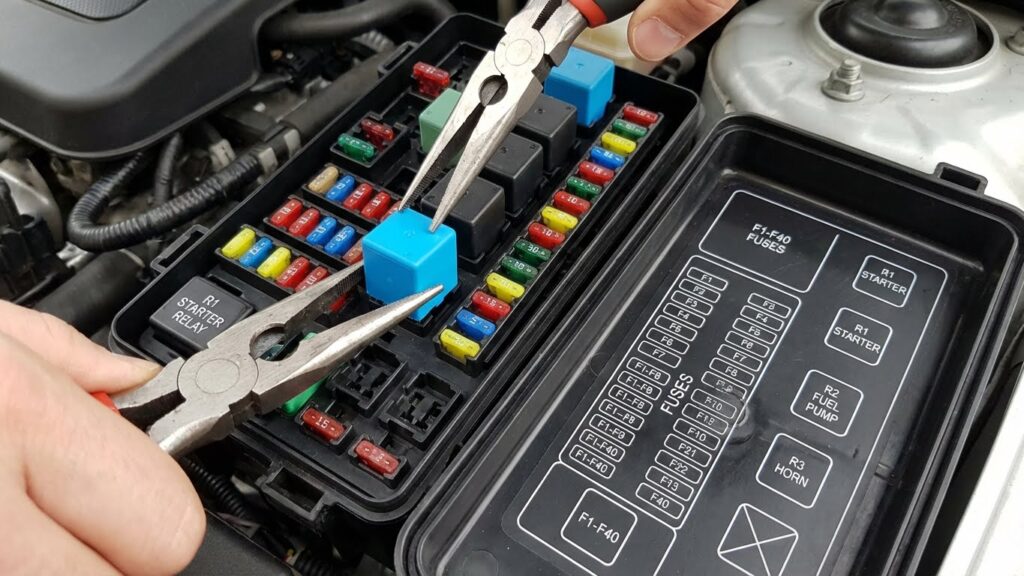
The starter relay controls the electrical flow from the battery to the starter motor. If the relay is faulty, it can cause clicking noises while preventing the engine from starting. A failing relay may cause the starter motor to receive insufficient power or no power at all.
Loose or corroded connections at the relay can also cause problems. Checking the relay for signs of wear or damage and ensuring tight battery and wiring connections is important. Replacing a bad relay is often an easy fix to restore proper starter function.
How to Test the Starter Motor
Testing the starter motor involves checking both its electrical and mechanical function. First, measure the battery voltage to ensure it is fully charged. Clean and tighten all battery and starter connections, as corrosion can mimic starter failure.
Next, a test with a multimeter can verify if the starter solenoid is getting power. Using a remote starter switch or jumper cables while observing the starter’s response helps determine if it cranks or not.
If the starter fails to engage or makes unusual noises during testing, it often needs repair or replacement. Testing confirms if the issue lies in the starter motor itself or elsewhere in the starting system.
Electrical System Checks
Checking the electrical components is key when a Toyota Camry clicks but won’t start. Problems often stem from small but vital parts like fuses, relays, wiring, or connections. These need careful inspection to rule out or fix common issues.
Inspecting Fuses and Relays
Fuses and relays protect the electrical system and help start the engine. A blown fuse can break the circuit, stopping power from reaching the starter or other parts. It is important to check the fuse box for any signs of damage or burnt fuses.
Relays act like switches, sending power to the starter motor. If a relay is faulty, the starter may not get the signal to engage, causing a clicking noise without engine turnover. Testing relays by swapping with a similar, working relay can help identify a problem.
Always refer to the Camry’s manual to find the right fuse or relay. Replace any damaged parts with the correct rating to avoid further electrical issues.
Examining Wiring and Connections
Loose or corroded wiring can prevent electricity from flowing properly to the starter. The battery terminals should be clean, tight, and free of corrosion. Even a small buildup can interrupt the current.
The wires connecting the battery to the starter and the ground wire to the engine block must be secure. Inspect for any frayed or broken wires, as these can cause intermittent clicking sounds.
It is useful to follow the cables visually along their path and gently wiggle connectors to check for loose fittings. Tightening or cleaning these connections often solves no-start clicking problems without needing expensive repairs.
Other Potential Causes of Clicking Noises
Clicking noises when starting a Toyota Camry can come from issues beyond the battery or starter. Electrical problems and fuel delivery glitches are common sources that affect the engine’s ability to turn over smoothly.
Engine Grounding Issues
A poor engine ground connection can cause clicking noises during startup. The ground cable ensures electrical current flows properly from the battery to the engine and starter. If this cable is loose, corroded, or damaged, the starter may not get enough power to turn the engine over, resulting in rapid clicking sounds.
Inspecting the ground connection is crucial. Cleaning corroded terminals and tightening loose ground cables often restores proper electrical flow. Failure to address grounding problems can lead to repeated no-start conditions and strain on other electrical components. Using a multimeter to check for proper voltage at the ground points is an effective diagnostic step.
Fuel System Problems
Fuel system issues can indirectly cause clicking noises when starting by preventing the engine from firing. Fuel pump failure or clogged fuel filters may stop enough fuel from reaching the engine, causing the starter to engage repeatedly without success.
If the fuel pump relay or fuse has problems, the fuel pump may not work despite the starter clicking as it attempts to crank the engine. Checking fuel pressure and inspecting fuel system components like the fuel pump, filters, and relays helps determine if fuel delivery is the root cause. Repair or replacement can resolve the no-start and clicking symptoms tied to fuel issues.
When to Seek Professional Help
If the clicking noise persists after checking the battery and connections, it is time to see a professional. A mechanic can diagnose issues like a faulty starter, bad electrical connections, or deeper engine problems. These problems often require special tools and expertise.
A clicking noise combined with the engine not turning over is a common sign of a weak battery. However, if replacing or charging the battery does not fix the problem, a technician should inspect the vehicle. They can test the starter and other electrical parts to find the exact cause.
Seek professional help if you notice:
- Clicking noise continues after battery replacement
- Car won’t start despite having a good battery
- The noise comes with other symptoms like dim lights or strange smells
- The clicking sound is loud or accompanied by grinding noises
Ignoring these signs can lead to further damage. Professionals can also ensure all repairs are done safely and correctly. This helps avoid additional costs and keeps the Toyota Camry running smoothly.
Routine maintenance and early diagnosis by a trained mechanic can prevent the clicking noise from turning into a bigger problem. It is best to act quickly if basic fixes do not work.
Preventative Maintenance Tips for Toyota Camry Owners
Maintaining the Toyota Camry involves careful attention to the battery and electrical system. These areas are critical in preventing clicking noises when starting and keeping the vehicle reliable.
Regular Battery Inspections
The battery is a common cause of clicking noises during startup in the Toyota Camry. Regular inspections help catch early signs of wear or failure. Owners should check the battery terminals for corrosion, which can block electrical flow and cause weak starts.
It is important to test the battery voltage periodically, ideally every 6 months or during scheduled maintenance. A fully charged battery should read about 12.6 volts. If the voltage is consistently lower, the battery may need replacement.
Also, the battery cables should be tight and free from damage. Loose or frayed cables reduce current flow and can trigger the clicking noise. Replacing old or weak batteries before they fail prevents sudden starting problems.
Keeping Electrical Components Clean
Dirt and corrosion can affect the Camry’s starter motor and related electrical parts, increasing resistance and causing clicking sounds. Regular cleaning of these components improves reliability.
Focus on keeping the starter motor connections free of rust and grime. Using a wire brush to clean terminals during routine service prevents buildup. Applying dielectric grease afterward helps block moisture.
In addition, inspecting and cleaning fuses and relays ensures proper electrical continuity. Dirty contacts can cause partial connection, leading to hesitant starts.
Keeping these electrical components clean supports smooth power flow, minimizing the chances of starting issues and extending the life of the starter system.
Conclusion
A clicking noise when starting a Toyota Camry usually points to an issue with the electrical system. The most common cause is a weak or dead battery. Corroded battery terminals or a poor electrical connection can also create this problem.
The starter motor and its components, like the solenoid, might be damaged or failing. This can prevent the engine from cranking even if one hears clicking. In some cases, wiring issues near the starter can cause similar symptoms.
Common factors to check include:
- Battery charge and condition
- Clean and tight battery terminals
- Starter motor and solenoid function
- Wiring and connections near the starter
Proper diagnosis is important. Using a voltmeter to test the battery and inspecting connections can save time and money. If these are fine, the starter should be inspected or replaced.
Ignoring the clicking noise can lead to complete no-start conditions. Timely action helps avoid unexpected breakdowns and keeps the vehicle reliable.
FAQs
Why does my Toyota Camry make a clicking noise when I try to start it?
A clicking noise usually means the battery is weak or dead. The starter motor does not get enough power to turn the engine over. This is often the most common cause and can be checked first.
Can something else cause the clicking sound?
Yes. Corroded battery terminals, a faulty starter motor, or bad wiring can also cause clicking. If the battery is fine, these parts should be inspected.
What should I check before calling a mechanic?
First, check the battery charge and clean the terminals. Make sure the connections are tight. Sometimes, simply jump-starting the car fixes the issue.
Is it normal to hear clicking noise when the engine is cold?
A soft clicking during a cold start can happen because the engine oil is thick. But if the clicking is loud or rapid, and the car won’t start, it is not normal.
How can a fuel problem affect starting?
If the engine cranks but won’t start, it might not be getting fuel. Issues with the fuel pump or filter can stop fuel delivery, causing a no-start with or without clicking.
Where can I find more about car battery care?
Sites like the Battery Council International offer clear guides on maintaining car batteries.
What if the clicking happens while driving?
Clicking noises during driving could indicate valve or engine problems. This is different from starting issues and needs immediate attention.
For more detailed advice on starting issues, resources like AAA’s car care guide can be helpful.