

Why Is OBD2 Scanner Not Working Find Causes and Fixes explains common reasons your OBD2 tool fails to connect and shows clear steps to fix it. Learn quick checks, connection tips, and advanced troubleshooting so you can read codes and monitor live data again.
Contents
- 1 Key Takeaways
- 2 Introduction
- 3 How to Start: Basic Checks
- 4 Connection Problems: Wired and Wireless
- 5 Compatibility and Protocols
- 6 Power Issues and Battery Health
- 7 Software and Firmware
- 8 Diagnostic Errors and Unsupported Codes
- 9 Troubleshooting: Common Scenarios and Fixes
- 10 Advanced Troubleshooting Steps
- 11 Practical Tips and Examples
- 12 When to Seek Professional Help
- 13 Summary of Steps
- 14 Conclusion
- 15 Author
Key Takeaways
- Point 1: Most connection problems are simple: check power, ignition, and the OBD2 port pins.
- Point 2: Compatibility matters: some scanners need specific protocols or apps to work with certain cars.
- Point 3: Wireless adapters often fail due to Bluetooth/Wi‑Fi pairing or app settings.
- Point 4: A dead car battery, blown fuse, or faulty port can stop the scanner from powering up.
- Point 5: Firmware and app updates can fix many bugs. Keep your scanner and app current.
- Point 6: Test with another scanner or vehicle to isolate whether the issue is the tool or the car.
Introduction
This guide helps you answer one clear question: why is obd2 scanner not working. You will learn simple checks, step-by-step fixes, and advanced troubleshooting. The steps use plain language. They suit beginners and DIY mechanics. Follow each step. Test your scanner as you go. By the end, you should find and fix the problem.
How to Start: Basic Checks
Start with the easy things. These fix most problems fast. If you ask, why is obd2 scanner not working, begin here.
Visual guide about Why Is OBD2 Scanner Not Working Find Causes and Fixes
Image source: i.ytimg.com
Step 1: Check Ignition and Key Position
Turn the key to the “ON” position. In many cars you need the engine off but ignition on. Some scanners need the engine running. Try both. If the scanner does not power on, move to the next step.
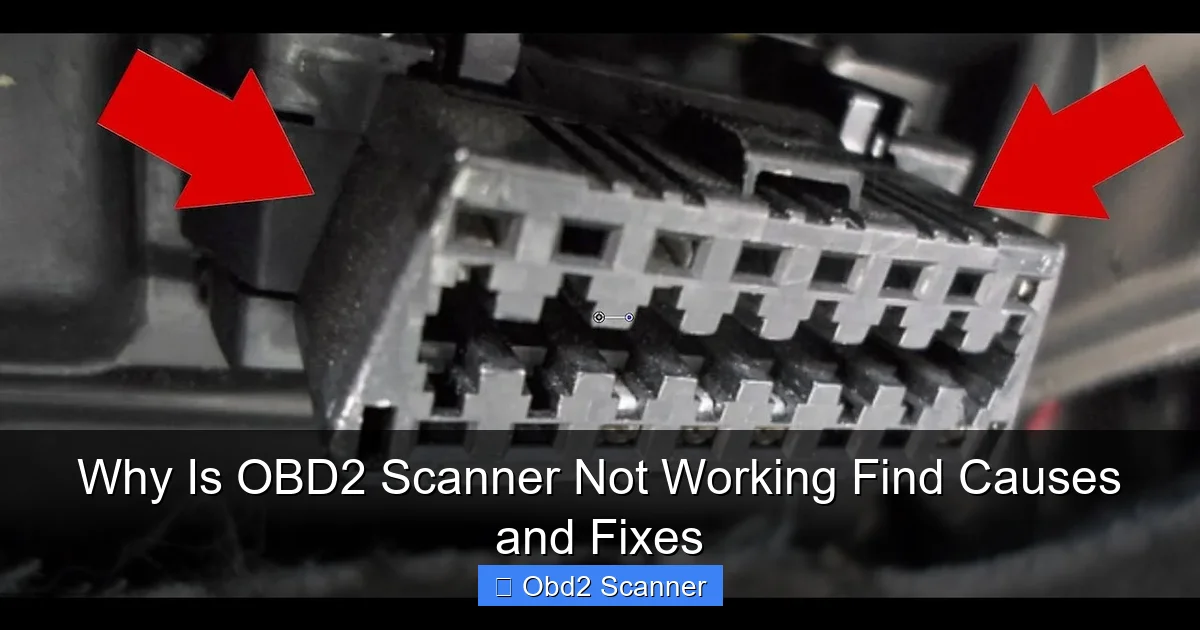
Step 2: Inspect the OBD2 Port
Look under the dash on the driver side. Find the trapezoid port with 16 pins. Check for loose pins, dirt, or damage. Clean gently with compressed air. Bent or corroded pins can stop a scan. If pins are damaged, the port may need repair.
Step 3: Power Indicator on the Scanner
Most scanners have a power light. If it does not light, the port may not supply power. Use a portable scanner or LED tester. If the device powers from a USB or battery, ensure batteries are charged. Many people skip this simple step.
Step 4: Check the Car Fuse
Locate the fuse box. Find the OBD2 or accessory fuse. Check the fuse for a break. Replace if blown. Some cars route power to the port through a fuse marked “OBD” or “Diag”. A blown fuse often explains, why is obd2 scanner not working.
Connection Problems: Wired and Wireless
There are two common connection types: wired scanners and wireless adapters. Each has its own issues. If you wonder, why is obd2 scanner not working, match your steps to the type you use.
Visual guide about Why Is OBD2 Scanner Not Working Find Causes and Fixes
Image source: guidingtech.com
Step 5: Wired Scanner Troubleshooting
Wired scanners use a cable and plug in directly. Check the cable for cuts or broken pins. Wiggle the plug gently while watching the scanner. If the display flickers or the device restarts, the cable or port could be at fault.
Step 6: Bluetooth/Wi‑Fi Adapter Checks
Wireless adapters are popular. They connect to an app via Bluetooth or Wi‑Fi. If the app does not connect, check your phone’s Bluetooth. Unpair and pair again. Restart the adapter by unplugging it. Check the adapter’s LED codes in the manual. Many users ask, why is obd2 scanner not working when it is just a pairing issue.
Step 7: App Permissions and Settings
Apps need permissions. Allow location and Bluetooth. Some Android phones require location to scan for Bluetooth LE devices. iOS may need Bluetooth permission set to “Always” or “While Using App.” Also set the correct protocol in the app if prompted.
Compatibility and Protocols
Compatibility is a top cause. Modern cars use several protocols. Older or specialty vehicles may not support all adapters. Keep compatibility in mind when you ask, why is obd2 scanner not working.
Step 8: Check Vehicle Protocol
Look up your car’s OBD2 protocol. Common types include ISO 9141‑2, KWP2000, J1850 PWM, J1850 VPW, and CAN. Many cheap adapters only support CAN. If your car uses a different protocol, the adapter will fail. The scanner manual or app often lists supported protocols.
Step 9: Vehicle Model and Year Limits
Some vehicles have manufacturer-specific protections. Heavy trucks and hybrids may need special tools. Some 1990s models use non‑standard connectors. Verify the scanner supports your make and model year. This step answers many “why is obd2 scanner not working” issues.
Power Issues and Battery Health
A low car battery can stop the scanner. Also, some vehicles put the ECU to sleep. These power states cause confusion. If you keep asking, why is obd2 scanner not working, check battery and power.
Step 10: Measure Voltage at the Port
Use a multimeter. Check 12V between pin 16 and pin 4/5 (ground). If voltage is below 11V, the battery is low. Charge the battery or jump start the car. Repeat the scan. Low voltage makes data unreliable and may prevent connection.
Step 11: ECU Sleep Mode
Some cars put the ECU to sleep if the vehicle is idle. Wake the ECU by turning the key to ON for a few seconds or starting the engine. Then try your scanner. If you still ask, why is obd2 scanner not working, proceed to software checks.
Software and Firmware
Old firmware or outdated apps often cause problems. Updates fix bugs and add support for new cars. If you ask, why is obd2 scanner not working, check for updates.
Step 12: Update Your Scanner Firmware
Visit the manufacturer’s website. Download the latest firmware. Follow the update steps in the manual. Keep the device connected to a reliable power source during updates. Firmware fixes many connectivity issues.
Step 13: Update or Reinstall the App
Delete the app and reinstall if it misbehaves. Clear the app cache on Android. On iPhone, reinstalling often clears odd errors. Check for app updates regularly. A fresh install can answer, why is obd2 scanner not working, when the app is the real cause.
Diagnostic Errors and Unsupported Codes
Sometimes the scanner connects but shows no codes or weird messages. This is also common. Let’s cover how to handle it.
Step 14: Read All Error Messages
Take notes of any messages. “No response from ECU”, “Unsupported protocol”, or “CAN error” are common. Search the exact message online. Manufacturer forums often provide targeted fixes.
Step 15: Try a Different Scanner
Borrow a scanner or visit a repair shop. If another tool works, your original scanner is likely faulty. If both fail on the same car, the issue is the vehicle. This A/B test helps answer, why is obd2 scanner not working, fast.
Troubleshooting: Common Scenarios and Fixes
Here are typical problems and direct fixes. Use these checks in order. They are fast and practical.
Scenario A: Scanner Does Not Power On
- Check ignition position.
- Check fuse and port power with a multimeter.
- Try another cable or scanner.
Scenario B: Scanner Connects But No Codes
- Verify vehicle protocol compatibility.
- Ensure the ECU is awake.
- Try reading live data. If live data is empty, ECU may be off or communication is blocked.
Scenario C: Wireless Adapter Won’t Pair
- Reset the adapter by unplugging it or pressing its reset button.
- Clear Bluetooth cache on the phone.
- Use a different phone or tablet to isolate the issue.
Scenario D: App Shows Error or Crashes
- Reinstall or update the app.
- Grant required permissions.
- Check for known app issues online or in forums.
Advanced Troubleshooting Steps
If basic checks fail, try deeper tests. These require tools and some technical skill.
Step 16: Check Wiring at the Port
Remove trim panels and inspect wiring to the port. Look for loose connectors, frayed wires, or rodents chewing wires. Repair any damaged wiring. Use a wiring diagram to trace the feed.
Step 17: Scan the CAN Bus
If your car uses CAN, check for shorted or open CAN lines. Use a scope or adapter that shows CAN bus activity. If the CAN bus is dead, many modules will not communicate, and the scanner fails.
Step 18: Use an All‑In‑One Diagnostic Tool
Advanced tools support maker‑specific protocols. They can talk to ABS, airbag, and other modules. If standard OBD2 tools fail, these pro tools may connect. This step is for shops or serious DIYers.
Practical Tips and Examples
Here are quick tips gathered from common issues. They are small but effective.
- Example: A user reported their Bluetooth adapter showed no lights. Unplugging and restarting the phone fixed the pairing. The adapter was fine.
- Tip: Always try a different car. If the scanner works on another vehicle, the problem is with the original car.
- Tip: Keep a small LED tester or spare cable in your tool kit. Quick tests save time.
- Tip: If you get intermittent connection, look for loose contacts or a weak battery.
- Example: A blown OBD2 fuse in a 2007 sedan caused a no‑power issue. Replacing the fuse fixed it.
When to Seek Professional Help
Some faults need a shop. If wiring is complex, if the CAN bus is dead, or if the port is physically broken, see a professional. If the ECU itself is damaged, a dealer or advanced shop is best. Ask for a diagnostic with a professional scanner or factory tool.
Summary of Steps
Repeat these steps if you still wonder, why is obd2 scanner not working:
- Check ignition and power.
- Inspect the OBD2 port and fuse.
- Try wired vs wireless checks.
- Update firmware and apps.
- Test with another scanner or vehicle.
- Inspect wiring and CAN bus for deeper faults.
Conclusion
Asking, why is obd2 scanner not working is normal. Most issues are easy to fix. Start with power and port checks. Move to software and compatibility next. Use step‑by‑step tests to isolate the issue. Keep your tools updated. If the problem is complex, get professional help. With this guide, you have a clear path to restore your scanner and read codes again. Good luck and drive safe.
